Skip to content
    001Enterprise Operations Platform

    A comprehensive enterprise multi-application management system. ISO Certified, GDPR Compliant, and trusted for implementation in organizations across Europe.

    ISO 27001
    Information Security
    ISO 45001
    Health & Safety
    ISO 9001
    Quality Management
    GDPR
    Compliant
    15
    Modules in one platform
    14
    Days free trial
    Web, iPhone and Android apps
    AI fills your weekly roster
    002The app

    See 365shift at work

    Real screens from the app, as a business admin sees them.

    365shift.com/scheduling
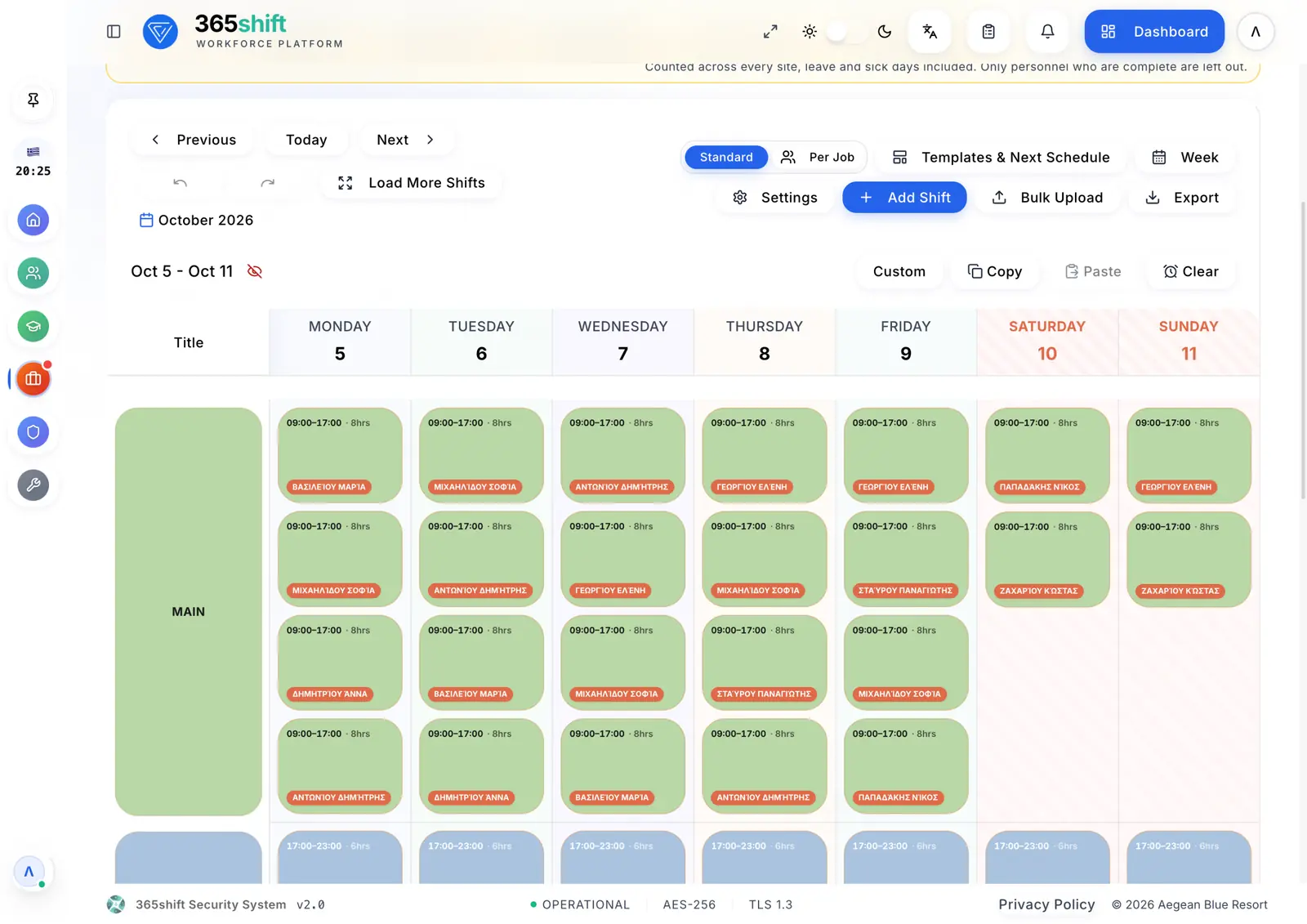
    Shift schedule: The whole week on one screen, by post. Draft, accept, publish.

    The whole week on one screen, by post. Draft, accept, publish.

    003Workforce Management

    Modules & Workflows

    Every workflow as it runs today, and the plan that includes it

    01 / 15

    Shift Scheduling

    Every plan

    From a draft week to a published roster every employee receives

    1. An admin or the team’s manager builds the week as a draft
    2. Approved leave is placed in the week
    3. The week is accepted; any later edit asks for acceptance again
    4. Publishing makes it visible to staff and clients
    5. Each person gets their shifts by email, push and chat
    6. Unpublishing tells everyone the week is under revision
    02 / 15

    Shift Swaps

    Every plan

    Two colleagues trade shifts, a manager approves

    1. An employee asks a colleague to swap a shift
    2. The colleague accepts or declines
    3. An admin or manager approves or rejects
    4. On approval both shifts are swapped in one step
    5. Everyone involved is notified at each step
    6. Nobody can approve their own swap
    03 / 15

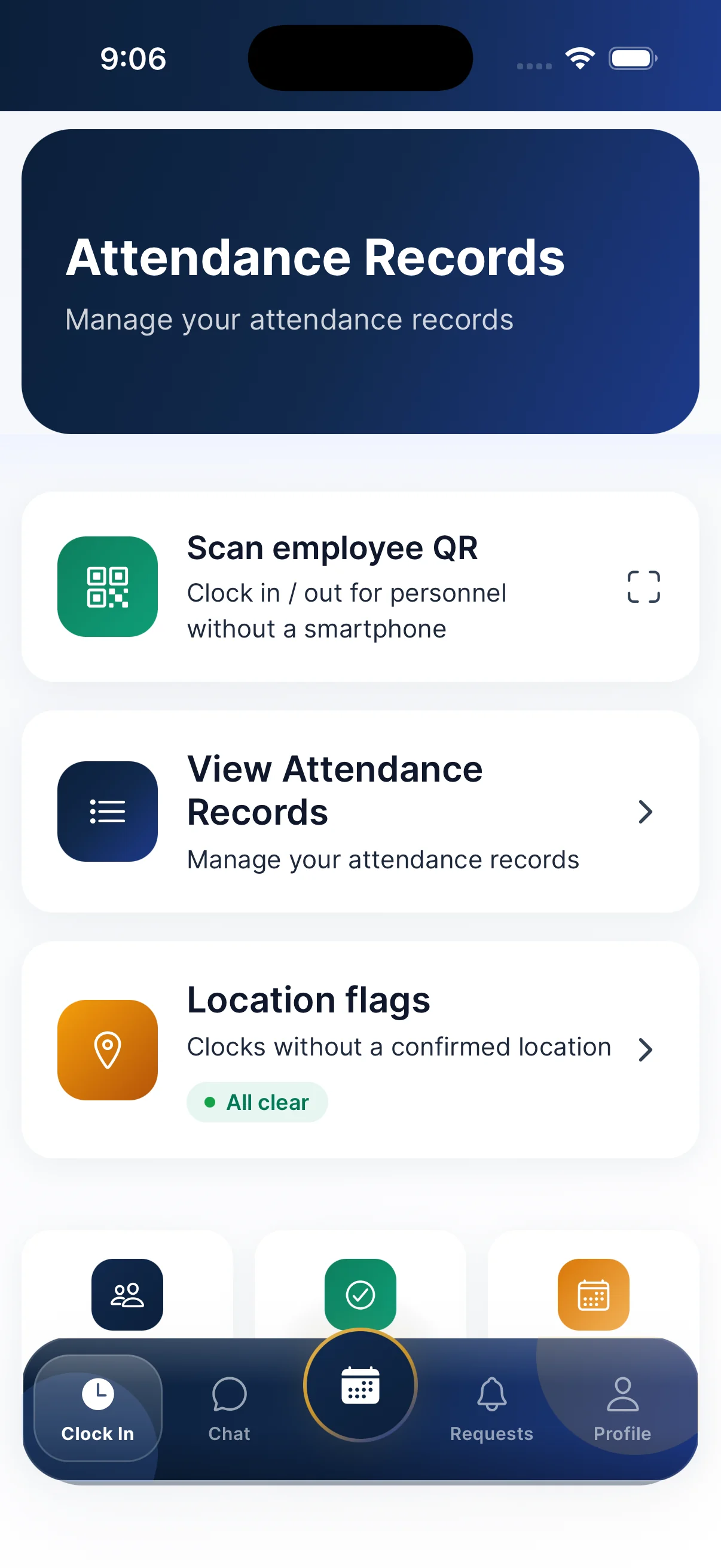
    Clock-in & Location Check

    Every plan

    Arrivals and departures from the mobile app, checked against the shift and the site

    1. The employee clocks in from the mobile app
    2. A clock-in needs a shift in the roster
    3. The location is checked against your work sites
    4. No or outside location: recorded and flagged to managers
    5. Or a manager scans the employee’s personal QR
    6. Managers review flags; a flag cannot be deleted
    04 / 15

    Leave Requests

    Every plan

    Request, decision and placement in the roster

    1. The employee submits the type, dates and reason
    2. Approvers are notified by email, push and in the app
    3. An admin approves, or rejects with a reason
    4. «Other» requests get a written answer
    5. The leave is placed in the roster
    6. The employee is told the decision
    05 / 15

    Client Portal

    Every plan

    Your clients see what concerns their sites

    1. An admin creates the client account and links its teams
    2. You choose which modules each client sees
    3. The client sees published weeks of their teams
    4. Leave figures for their teams, read-only
    5. Clients never edit shifts or approve leave
    06 / 15

    ΕΡΓΑΝΗ Digital Work Card

    Add-on · Advanced & Expert

    Employees’ own clock-ins declared to ΕΡΓΑΝΗ ΙΙ

    1. Each clock-in and clock-out is queued for ΕΡΓΑΝΗ
    2. Sent with your company’s own ΕΡΓΑΝΗ credentials
    3. Automatically every minute, or by hand
    4. You see what was accepted or rejected
    5. Late declarations by admins only, for force majeure
    6. Working-time declaration, re-filed when a declared day changes
    07 / 15

    AI Scheduler

    Add-on · Expert

    Fills the draft week and explains every choice

    1. Auto-fill fills empty slots by your rules
    2. Each assignment comes with its reason
    3. The assistant proposes changes in plain words
    4. Only draft weeks are changed
    5. You apply or reject; nothing is published by itself
    08 / 15

    Hiring

    Advanced & Expert

    From candidate to new employee

    1. Add the candidate and the team they are hired for
    2. Book interviews; invitation with calendar attachment
    3. Automatic reminders to candidate and interviewers
    4. Up to three stages with the team’s interview template
    5. Optional skills test by private link, graded automatically
    6. Hire into Personnel, or reject
    09 / 15

    Staff Evaluation

    Advanced & Expert

    Your company’s own questionnaires, scored by the right managers

    1. Admins design questionnaires and assign them to teams
    2. An evaluation is started and an evaluator assigned
    3. The evaluator is notified by email and chat
    4. Team managers or admins evaluate; nobody evaluates themselves
    5. The score is calculated on submission
    6. Each person’s performance score from their evaluations
    10 / 15

    Training & Work SOPs

    Advanced & Expert

    Courses with a quiz and certificate, plus per-team instructions

    1. Write a course, with AI drafting if you want
    2. Assign to everyone, teams or people, with a due date
    3. Lessons and a quiz graded on the server
    4. Pass: certificate with a QR check
    5. Due, overdue and renewal reminders
    6. Team SOPs that staff acknowledge per version
    11 / 15

    Ethics & Compliance

    Advanced & Expert

    Company policies staff read and acknowledge

    1. An admin uploads or writes a policy
    2. Staff open or download it
    3. They are asked to acknowledge it
    4. Each acknowledgement is recorded
    12 / 15

    Equipment Tracking

    Advanced & Expert

    Stock, assignments, requests and returns

    1. Catalogue items with stock and minimum stock
    2. Assign items to people
    3. Admins or managers approve or reject requests
    4. Returns are recorded
    5. Low-stock warnings
    13 / 15

    Team Chat

    Expert only

    Team channels and direct messages

    1. A channel for each team, plus direct messages
    2. Send, edit and delete messages
    3. Live updates and push notifications
    4. Roster, HR and evaluation cards arrive in the chat
    14 / 15

    Site To-Do Lists

    Expert only

    A to-do list for each site

    1. Pick the team or site
    2. Add a task with category and attachment
    3. Ongoing or with an end date
    4. Completed by admins or the client
    15 / 15

    Whistleblowing

    Expert only

    A link from the app to your whistleblowing platform

    1. A tile on the dashboard and in the menu
    2. Opens your company’s reporting platform in a new window
    3. Reports are not stored in 365shift